
Keeping clients' computers safe and profitable for over 30 years
Home Forms About Current Newsletter subscribe
Search All Articles
Browse by Category

Checking Your Windows Restarts
|
Preview: How often should you restart your Windows computer? Learn the quick steps to check your system's uptime using Task Manager. |
Windows 11
- CTRL-Shift-Esc
- Select Yes
- Select Performance
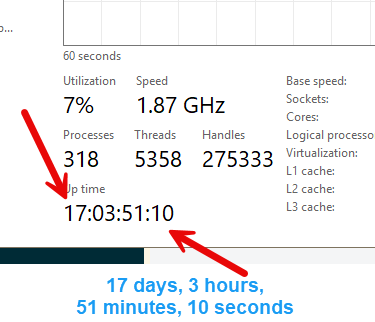
- Check uptime at the bottom.
This is what the uptime display looks like.
Date: August 2026

This article is licensed under a Creative Commons Attribution-NoDerivs 3.0 Unported License.