
Keeping clients' computers safe and profitable for over 30 years
Home Forms About Current Newsletter subscribe

Password Managers: 2 Approaches
|
 |
Password managers are absolutely essential. They prevent two of the worst security risks.
- Reusing the same password. If you do this, and they hack one site, they'll try that password elsewhere.
- Weak passwords. Any password that has ever been used anywhere before. Roughly 1 billion passwords are in password dictionaries compiled from previous breaches. The only way to eliminate this possible problem is for a machine to create a random password consisting of more than 20 characters and using all character types.
Last month I wrote an article about a reasonably secure way to create the one password you'll need to remember, the password to your password manager.
Password managers are of two types:
- Local managers reside on your computer. They are not on the Internet or accessible from the Internet. For this type, I recommend KeePass for Windows. These have the advantage of being offline so hackers anywhere in the world can't get it. But, the disadvantage of not being able to synchronize your phone, tablet, and computer(s). You can still find a way to save or sync yourself, but it is difficult.
- Cloud-based password managers. For this type, I recommend Bitwarden. These have the possible weakness of living online and being in a large website that is an enticing target for hackers. But these keep the passwords for all your devices in sync.
Local password managers are not safer!
For decades I operated on the belief that we were safer keeping our passwords offline. The idea was that putting all our passwords online would increase the chance of losing control. I thought this was obvious and didn't question it. But I no longer believe it. Each of the two types has its security pros and cons.
The local managers like KeePass don't have their passwords online. But though that seems like a good thing, it is also a bad thing. An online password manager like Bitwarden looks at the website and all the coding beneath the service. So, if you were to hit a link and go to a site that appeared to be what you wanted but wasn't. Bitwarden would not offer to fill in your passwords, because even if you didn't carefully read the address, it would. However, you would not have any warning if you used KeePass.
You might ask, but what if Bitwarden gets hacked? Aren't all my passwords vulnerable? The answer is, not really. Everything is encrypted locally on your own computer. If your password is good, it would require, say, 10 billion years to crack it if Bitwarden was breached. Furthermore, Bitwarden by default runs your password through 600,000 iterations. So the actual cracking time is 600,000 times 10 billion years. Don't worry about it. Furthermore, they are audited at least once a year and do an outstanding job keeping clean.
Even so, isn't it better just not to be off the Internet entirely? Yes, but you lose the advantage of having it look at the sites you visit and making sure those work with the record you've got in the program. Assuming a very strong master password, I don't think either one comes out on top. The disadvantage of being online is balanced by its power to help prevent you from sticking your passwords in fake sites.
In fact, I give the nod to Bitwarden because all your devices will have your current passwords, and you won't be as tempted to have a password you could type on your phone. In other words, one that can be hacked.
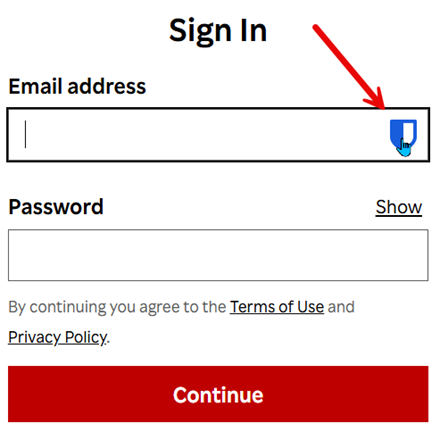
As you can see, the Bitwarden browser extension sees the site I'm on and provides an icon to enter the email address and password. If I were in the wrong place, it wouldn't show that icon. They wouldn't match. This provides a small improvement in security, which balances what is lost by having the database online.
An advantage for KeePass
However, one advantage of KeePass is its backup. KeePass keeps your passwords in a simple file, which will be part of your default backup procedure. You'll automatically have multiple backups without doing anything special because the local file gets backed up by your standard backup process.
Furthermore, the KeePass format is well established and used by many programs that have splintered off from it. So, even if KeePass were to stop being supported and then developed a fatal conflict with Windows, you could use your KeePass data with many other programs.
To back up Bitwarden's vault, you must log into their website and export your vault, and then import it into KeePass and delete the unencrypted exported file.

This article is licensed under a Creative Commons Attribution-NoDerivs 3.0 Unported License.