
Keeping clients' computers safe and profitable for over 30 years
Home Forms About Current Newsletter subscribe
The Wildly Successful ClickFix Scam
|
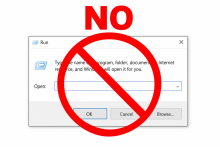 |
One of the most common new attack types is the ClickFix malware. This tricks you into actually loading up and running malware on your computer.
How It Works
- A malicious webpage displays a fake error, CAPTCHA, or verification prompt.
- It instructs you to "fix” it by pressing Win + R to open the Run dialog.
- It tells you to paste a command that it provides.
- Running that command silently installs malware on your system.
Why It's Dangerous
- The commands often install infostealers. These install malware to steal passwords, crypto wallets, and banking data.
- It bypasses many security tools because you are executing the command voluntarily. The Windows Run command (Windows-R) allows the user to directly command Windows to do something.
- It looks convincing—fake Google, Cloudflare, or Microsoft branding is common.
How to Stay Safe
Unless you are extremely computer savvy,
- Never open the Windows Run dialog (Win + R) at a website's request.
- Never paste commands from a website into PowerShell, Terminal, or Command Prompt.
- Never run a command you don't understand to do something you don't understand.
- Legitimate services (Microsoft, Google, your bank) will rarely or never ask you to do this.
- If you see such a prompt, close the tab immediately.
If you think you've already run one of these commands, disconnect from the internet and run a full malware scan as soon as possible.
The Exception
There are a few times when such commands should be run by some people. If you are moderately skilled and are on a site trying to get information about how to fix or diagnose a problem. The website might legitimately ask you to run a Windows command or a complex entry. In last month's newsletter, I explained how to upgrade your Windows 11 to version 25H2 if you were still on 24H2. To check whether it worked, I suggested using the Win + r command and enter winver which will provide a window with the current Windows version.
So, this makes total sense and is easily understood, including the command. Enter "winver” to get the Windows version makes sense. If you don't understand the command, don't run it. Don't assume the site you are on is really the site you think it is, particularly if you clicked a link to get to it.
Because of the prevalence of this malware, no legitimate website whose web administrators have multiple brain cells would use a Windows run command for a CAPTCHA check. If you see it, close the tab immediately.

This article is licensed under a Creative Commons Attribution-NoDerivs 3.0 Unported License.