
Keeping clients' computers safe and profitable for over 30 years
Home Forms About Current Newsletter subscribe

It's Time for a Windows Upgrade
|
Preview: After waiting several months for early issues to settle, this article recommends upgrading from Windows 11 24H2 to 25H2. It explains how to release upgrade controls, let Windows install it, and verify success. |
To stop Microsoft from jumping in and upgrading you, I used GRC's InControl portable app. If you are using me for maintenance, it'll either be in your portable app folder or your maintenance folder. Just run it and relinquish control.
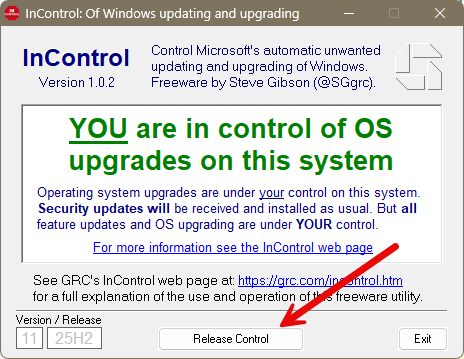
Within a few days after you've relinquished control and restarted your computer Microsoft should start the upgrade process. You can continue to work pretty much unaffected. After it decides to upgrade you and spends a couple of hours doing that, it'll be ready to restart, and you'll see something like this in the system tray.

And you'll let it restart and upgrade.
You can check that it really did it right by pressing Windows - r and then typing winver. It should tell you that you are on version Windows 11 25H2 instead of 24H2. You could also check with InControl.

This article is licensed under a Creative Commons Attribution-NoDerivs 3.0 Unported License.