
Keeping clients' computers safe and profitable for over 30 years
Home Forms About Current Newsletter subscribe

Tab-Aware Browsing
|
 |
One of the neatest new expansions of AI is tab-aware browsing. This means that your browser is going to have an AI model agent in it, which can look at the tabs you are seeing on the Internet and assist you by doing these things:
- Check a news story and confirm, expand, review, and discuss it with you.
- Look at an editorial article and present the best arguments against it.
- Present the actual data supporting and contradicting an article
- Look at a product you are seeing and summarize its pros and cons. Then find competing products for you. It could even compare products you've found in multiple tabs!
- If you are using webmail (like Gmail inside your browser), examine a possibly shady email for you and help you determine what to do. It could also help you rewrite an email you aren't happy with.
- Summarize and explain a technical article, legal document, or insurance policy in simple terms.
- Turn a travel blog into a 4-day itinerary with an estimated budget.
- Perhaps find coupons or better prices for something you are trying to buy
- Explain parts of the article that use terminology or abbreviations you don't understand.
All of these are wonderful and useful benefits we can now access.
The Catastrophic Problem and its Solution
Sadly, this was just beginning to begin when miscreants stormed the castle with dozens of malware browser extensions. They offered ChatGPT or Gemini browser add-ons, which are ok at first but get updated into malware. The problem is that neither Google nor Firefox checks updates to extensions carefully. New extensions are examined, but not updates. So, extensions are offered, then bot farms give them hundreds of great ratings and reviews, and then they update them into malware.
A single research team, LayerX, recently identified 30+ malicious AI-themed extensions affecting roughly 260,000 users. Though they appeared to be separate extensions, they were all using much of the same code, so they are from a single miscreant source. This is a worse concern than most extension malware because you need to give the tab-aware browser extension privileges that most extensions don't have. They must, for example, look at all your tabs, not just the current one.
What to do?
My strong advice is NEVER install any AI extension unless it comes from an absolutely trusted source that won't get acquired by an untrustworthy company. This rule isn't bad for all extensions, but extensions that can read your other browser tabs and see what you are doing are exceptionally dangerous.
Two recommendations
So far, despite offering AI, I'm not impressed or comfortable with either Edge and the CoPilot or Google's Chrome and their Gemini. They aren't trustworthy, and they don't implement it very well. Firefox doesn't offer tab-aware AI at all. They simply offer a launcher for regular AI.
The two I've found who do a good job and are reasonably safe and privacy-focused are
- Perplexity's Comet Browser. - This one builds the AI into the browser itself.
- Brave's Leo has an extremely privacy-focused AI that keeps all your interactions on your computer, not the cloud. This is my choice.
Using Comet
Comet is easy enough. Just download and install the browser, and then, when you want to check an article, just hit the Assistant option in the upper right, and a panel will appear for your questions. Perplexity subscriptions are $20/month or $200/year.
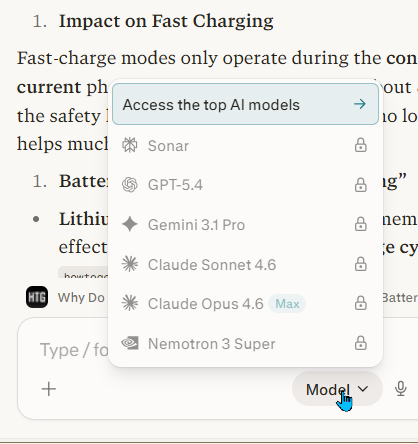
As you can see, Comet offers a reasonable AI for free but also gives subscribers access to models from a few other companies. Subscriptions have higher limits and access to premium models. However, the free use is generous, so most of you won't be hit with the limits.
Perplexity has had trouble because they sold and shared user data. They are not as privacy-oriented as Brave, but they are getting better, and I think they are basically a decent company. I used them for over a year before I found Poe.
Using Brave's Leo
You can activate Brave's Leo either from the top right icon or the left tiny panel menu icon. They currently offer 6 models for free, plus many along with their paid plan.
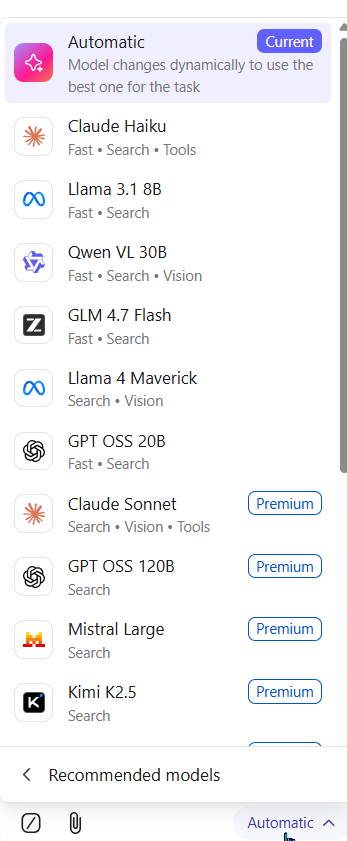
In addition, they allow us to link to our own models. Since I have a Poe subscription, I not only use Leo's free models, but also I've created links to use 5 of Poe's models as well. Because of this, I can use some more expensive premium models from Poe inside Brave without needing to pay for a Leo subscription in addition to my Poe subscription.
Brave is a privacy browser equal to Firefox in that category. They store your query history encrypted locally. It does not operate in private mode. They don't collect or sell your information.
A Leo AI premium subscription is $14.99/month or $149.99/year.
Both Brave and Perplexity have limits on in-depth research. Perplexity is transparent; Brave is not. Perplexity would be better for in-depth research. Leo is fine, though, and offers more privacy. I only pay for Poe because I like getting the option of even more models, but I do use Leo inside Brave.
I do like Leo's ability to query a second model about the explanation received from another model. I do this frequently with Poe and was pleased to see it worked in Leo as well.
Summary
Tab-aware browsing is wonderful. Once you make it part of your routine, you'll be glad you did. I don't find Firefox's implementation useful. It is better to simply have pinned tabs to a few different models. I wouldn't want to use Chrome or give Google even more information about me. Currently you can get good implementations of tab-aware browsing with either the Comet Browser or Brave's Leo. Of those, I prefer Leo, but I already use Brave. Both allow reasonable usage for free.

This article is licensed under a Creative Commons Attribution-NoDerivs 3.0 Unported License.