
Keeping clients' computers safe and profitable for over 30 years
Home Forms About Current Newsletter subscribe

Poe Tips #1
Tip 1: Understanding AI pricing
All AI bots charge you somehow and don't let you bankrupt them. So, even if they are free, they will limit you. So, it is important to understand what is costing THEM money and limit that so when you need them to really work for you, they aren't limiting you.
All AI models spend resources to do these things.
- Read and understand your input. The longer and more complex the input, the more it costs. Don't waste words.
- Thinking about what you asked. How much time and effort will it use thinking about its answer and making sure it is correct? A simple factual answer may not require much thought, but "Explain quantum computing and its potential uses and dangers in a detailed fashion, assuming I'm computer literate but not a programmer.” will require more thought.
- Summarize and organize its output. Every word it writes on output is a cost to their system. These output costs are usually much more than input costs. Normally output is 6-8 times as expensive per character as input. A good reason for you to think about your input question. If I only need a short answer, I tell it, to summarize or answer in 3 paragraphs.
- Use its own database or search the web? All the models are trained on a lot of data. Imagine a thousand newspapers, 500 million Internet pages, 50 encyclopedias, all of Wikipedia, a dozen social media platforms, and more. Using that information isn't costly because it has it all and has processed and indexed it. That information is essentially "at its fingertips.” But that training may have ended a year ago. If you want current information, then it not only needs all its training, but it must also read 30-50 articles related to your topic, synthesize them, and merge them with its internal database. That is resource intensive.
These four things: process input, think, organize output and actually output, and finally sometimes search for current information, are added together to create a resource cost. It may be willing to give some of that away for free, but not too much. Even on paid accounts, they'll limit you if you are costing it too much.
Tip 2: Use settings if available
On Poe, some bots allow you to control these factors. Here is the settings page on Poe's Claude Sonnet 4.5.
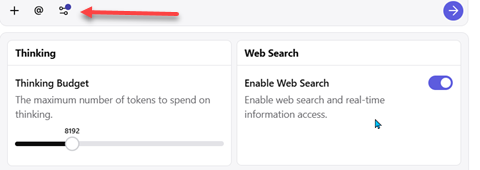
The top arrow points to a settings or options menu for that bot's chat. Some bots have options; some don't. Claude Sonnet 4.5 offers these settings. The web search is obvious. If you need current information, you'll need to enable it. It defaults to off. For the thinking budget, it is mis-labeled. It is an additional thinking budget. It thinks just fine, but if you want deeper thought and more steps, you can give it permission to use extra thinking resources up to some limit.
Tip 3: What am I spending and getting?
Go to Settings on the left panel, then the Points section shows your available points, and the View Points History will display how much every query costs. You can begin to understand the differences.
Tip 4: Setting your default model
Go to Settings on the left panel, then scroll way down to the Default app box and choose your default app. It will present that as the choice for new chats and as the first of your three most recently used bots.

This article is licensed under a Creative Commons Attribution-NoDerivs 3.0 Unported License.