
Keeping clients' computers safe and profitable for over 30 years
Home Forms About Current Newsletter subscribe

How to improve your computer experience
|
 |
One way to improve your computer experience is to improve your chair or desk. But often overlooked is the keyboard. The keyboard is the major way we connect with our computer. The mouse comes in a distant second for businesspeople. There are 3 different categories of keyboards.
- Membrane keyboards. These are what normally come with a desktop computer. Underneath the keys, there is a single rubber or silicone sheet with little domes. When you press a key, you squash the dome down until it touches a circuit board, completing the electrical signal. The Feel: Because you are squashing rubber, the feel is often described as "mushy.” You have to press the key all the way down (bottom out) to get the letter to appear. This can cause hand strain.
- Mechanical keyboards. Underneath each keycap is an individual, self-contained mechanical switch. This switch contains a spring, a stem, and metal contacts. The Feel varies based on the switch, but generally, it is crisp and consistent. Crucially, the key registers the letter before you hit the bottom. These are normally clickier, easier on the hands and fingers, and better for typing. They also cost much more.
- Most laptops use a scissor-switch membrane keyboard: a rubber dome or membrane for the electrical contact, plus a low-profile scissor mechanism that stabilizes the keycap. This keeps them thin and quiet, but the feel is typically "soft” or "mushy” compared to full mechanical switches, even if some models have crisper tuning.
Why switch to a mechanical keyboard?
- Durability. Mechanical switches normally last 10 times as long. They always feel the same even after many years.
- Accuracy and comfort. Mechanical keyboards actuate at about halfway down. The touch is lighter, and your fingers will experience less fatigue. A lighter touch reduces strain and increases speed. The click feedback helps as well.
- Mechanical keyboards offer a choice of depression distance and pressure.
- Repairability. Most mechanical keyboards allow you to easily and simply replace a switch that stops working. You don't need to replace the entire keyboard.
- Basic feel. Mechanical keyboards just feel better and sound better.
My keyboard
My needs and desires
- I have a pull-out tray under my desk. I wanted my mouse and keyboard to fit on the tray, so my keyboard needed to be 16" at most.
- Full-size keys with curvature. I want the keys to be higher on the sides.
- A numeric keypad
- Great feel.
What I got and what it has
What I got was a mechanical 96% keyboard. 96% keyboards have all the keys, including function keys, a numeric pad, number keys, and navigation keys. They just get rid of most of the wasted space and sometimes reduce the size of seldom-used keys.
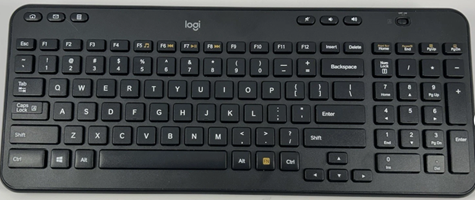
My old Logitech keyboard. 106 keys with standard ANSI layout. The regular 100 keys plus 6 dedicated hotkeys for media.
This is my old keyboard. You can see that they moved the navigation keys under the Enter key to save space but have nearly all the keys. However, they waste a lot of space.
I bought a Keychron K17 Pro keyboard. It has 103 keys with an ANSI layout. It changes a few keys, adds 3 extra keys, but skips a few. All keys are full size.
My missing keys:
Scroll Lock, Pause Break, Insert, End.
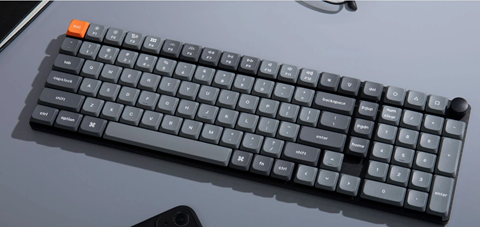
The only one I wanted was the End key. I frequently want to go to the end of a line. So, I used their website to run a program that mapped one of their three undefined keys to END. I haven't figured out what to do with the other 2 keys. The entire keyboard can be remapped however you like.
I don't necessarily think this is the best keyboard for everyone, or even the best for me. But I'm happy with my purchase, and it elevates my relationship with my computer!

This article is licensed under a Creative Commons Attribution-NoDerivs 3.0 Unported License.