
Keeping clients' computers safe and profitable for over 30 years
Home Forms About Current Newsletter subscribe
Search All Articles
Browse by Category
Wonderful Keepass Plug-in
One of the great benefits of some Open Source software like Keepass, is the plethora of add-ins that are available for it. Once you have a popular program like KeePass, some people who want new feature write it for themselves, polish it, and make it available to everyone. Keepass appears to have generated nearly 100 of them.The one Plugin for Keepass that I find incredibly useful is AutoTypeSearch.
What it does
If you don't know what Auto-Type is, I've written an article about it here, and have a video as well. This article explains how to change the default macro. Once it is working for you, you will sometimes go to a website that the Auto-Type hotkey doesn't work for. That's when AutoTypeSearch pops up and searches. So for example, I haven't bothered to setup an Auto-Type for Kobo Bookstore. When I go there to get a book and need to login, Ctrl-Alt-A doesn't work. Since it fails, Auto-TypeSearch immediately pops up and awaits input. I begin typing ko for kobo and the correct password record pops up and I press [ENTER] and am immediately logged in.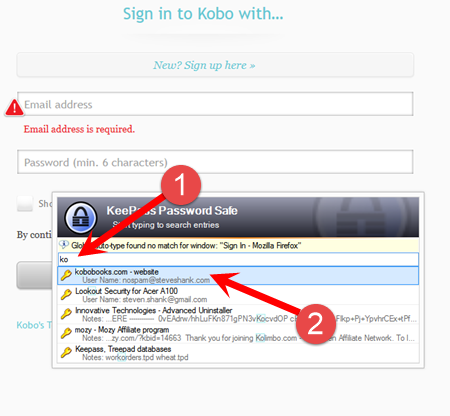
As you can see above, I tried CTRL-ALT-A for Auto-Type and it didn't work. Kobo popped up with "Email address is required". So AutoTypeSearch pops up and I typed ko. A list appeared of the items I have which have the letters ko somewhere in the record. Kobo is on top, because letters in the name count more than other places in the record. I pressed [ENTER] and was immediately logged in.
This way you can immediately have automatic login even for sites that you haven't set automatic login for, and don't have a clear window that Keepass can associate with the login screen.
How to Install
You download the program from http://sourceforge.net/projects/autotypesearch/. Then unzip it. You'll have 2 files, a readme.txt file which you should probably read, and the AutoTypeSearch.plgx file with is the actual plugin. All you need to do is copy the plugin to the Keepass program folder (probably C:\Program Files (x86)\KeePass Password Safe 2) and restart KeePass. If you have other plugins you might have a special plugin subfolder, in which case stick the plugin into that folder.Happy log-ins.
Date: June 2015

This article is licensed under a Creative Commons Attribution-NoDerivs 3.0 Unported License.